Optimize
The question this page answers is the one the foil page cannot: can a section be better at exactly these points. Give it a starting section, the operating points from Mission and the limits the structure and the shop impose; it hands back a new section, its polar beside the old one, and the figures to judge it by. It is metered: 3 free runs a month with an account, then 3 credits a run. A run that returns nothing is not charged.
The objective
A single-point drag minimum produces knife-edged sections that win at one lift coefficient and fall off a cliff everywhere else, so the solver works on several points at once. Each operating point is a Reynolds number and a lift coefficient the section must reach, and the drag it pays there counts with that point's weight. It minimises the weighted sum of those drags and reports their root-mean-square, one number for the whole envelope, which the headline percentage compares.
The starting section
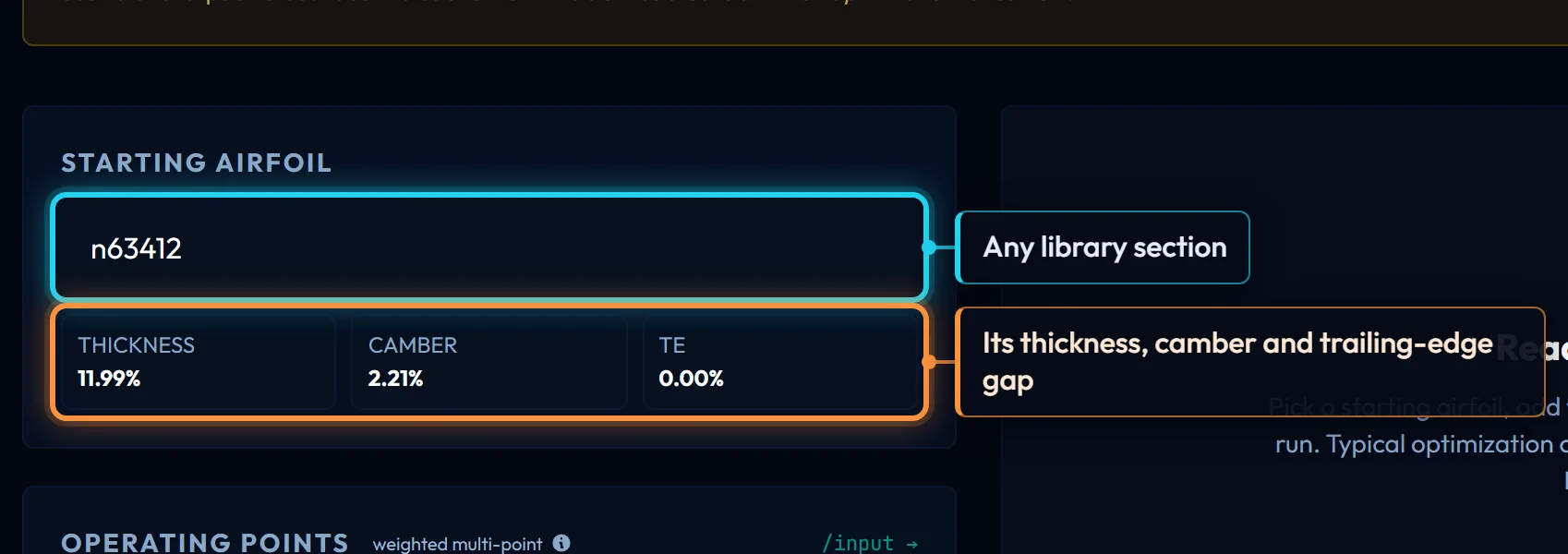
Pick any library section. Its polar is the dashed Starting curve and the baseline for the improvement; the three readouts under the box show its thickness, camber and trailing-edge gap. For the running example the start is n63412, the section Mission chose and the foil page read. A start near your limits converges fastest, but one outside them no longer decides the answer.
Operating points
Each row is a Reynolds number (10,000 to 50,000,000), a lift coefficient (-1 to 2.5) and a weight (0.1 to 100), up to 20 rows; the weights are normalised, so only their ratio matters. Mission fills them in from your speeds and chord. For the running example they are cruise at Re 700,000 and CL 0.35, and take-off at Re 400,000 and CL 1.1, weight 1 each; the second row stops the solver thinning the section until it stalls before take-off.
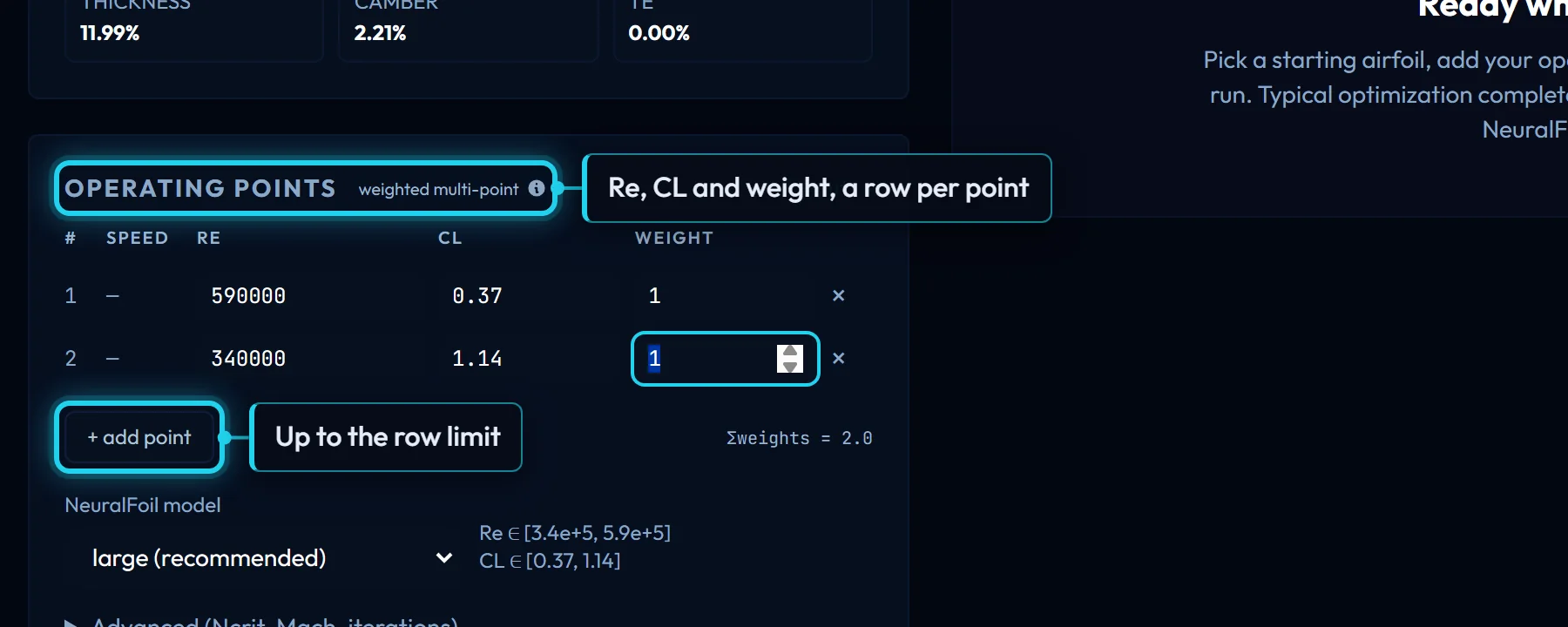
NeuralFoil model is the network that scores every candidate; large is the default and what the stored polars use. Under Advanced, Ncrit is the transition setting, Mach is 0 for water and most model aircraft, and Max iters caps one IPOPT solve at 120 by default, 400 at most.
Constraints
Without limits the solver finds the thin, cusped section drag minimisation always finds. Four rows stop it, in the units the page shows:
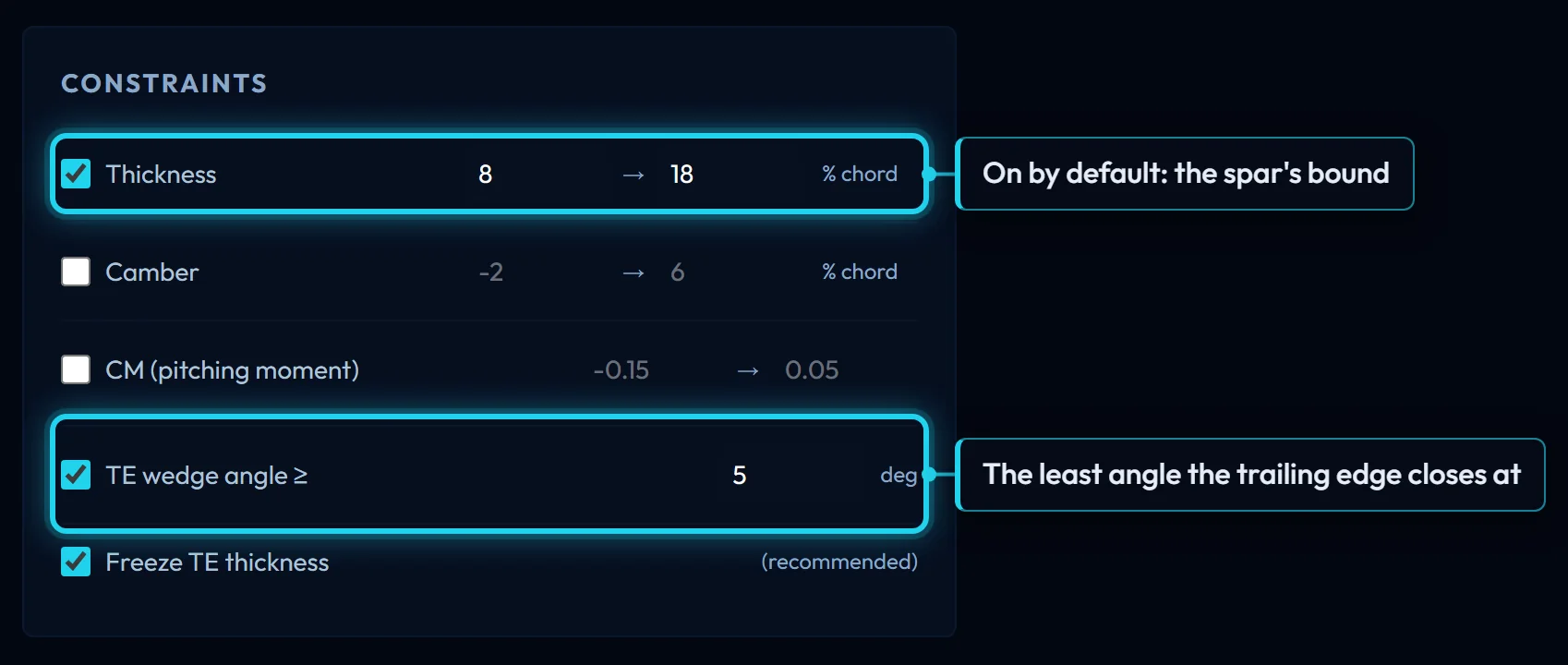
- Thickness, on by default at 8 to 18 % of chord, bounds the peak thickness. It is the spar's constraint.
- Camber, off by default at -2 to 6 %, bounds the peak camber; a band within 0.25 % of zero asks for a symmetric section.
- CM keeps the quarter-chord pitching moment at every point inside a range. Camber buys drag with nose-down moment, and this is how a flying wing or a stabiliser refuses that trade.
- TE wedge angle, on by default at 5°, is the least angle the surfaces may close at; Freeze TE thickness holds the gap at the start's value.
A minimum above its maximum is refused before anything runs, and so is a lift coefficient the start cannot reach below its stall.
Running it
Transcript
- Start from the section you read: the NACA 63-412.
- The operating points are the two from Mission: cruise at Re 590k and CL 0.37 with the weight, take-off at Re 340k and CL 1.14.
- Thickness and camber bounds say what the solver may not change; the structure sets them, not the aerodynamics.
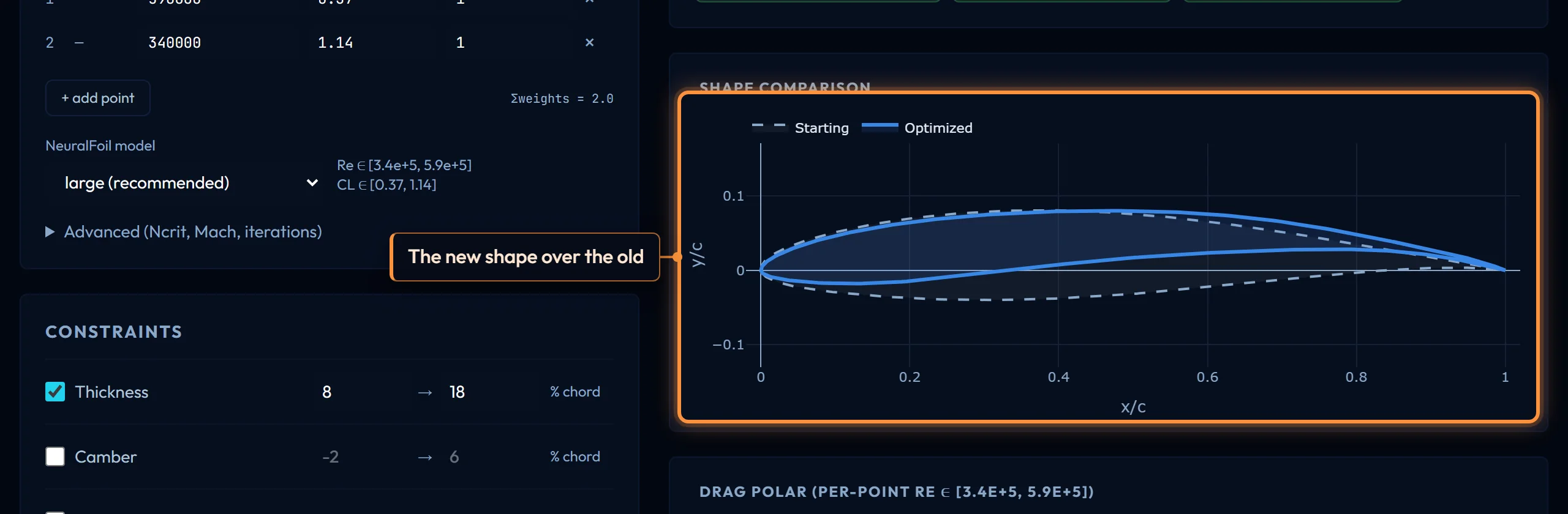
- Run: a population search then IPOPT with analytic gradients, up to about a minute. The result is the RMS drag over the points, before and after, and the new shape over the old.
Press Run and the solver does three things. It runs a gradient solve from your start: IPOPT, the interior-point solver behind AeroSandbox's Opti, with every gradient computed exactly by CasADi automatic differentiation through the CST geometry and NeuralFoil itself. It then searches a population of candidate sections, scoring a whole generation in one NeuralFoil call, so a start outside the thickness or camber box costs nothing, and refines the best with IPOPT. The better of the two answers is returned, after a check that it reaches every operating point with NeuralFoil confident of its prediction at each. Typical runs take 10–35 seconds, up to about a minute with many points. The log under the button narrates the run; "IPOPT iterations" there, on the tile and on the convergence plot's axis are one count.

What comes back
The headline −x % CD is how much lower the RMS drag coefficient is than the start's, over the points both sections reach; grey means the solver handed the start back. RMS CD (start) and (opt) are those two figures, the second re-evaluated on the section you are given. Thickness, Camber and TE angle are measured on the result, so a value sitting on its bound says which constraint did the work. IPOPT iterations, NF evals and Duration describe the run; few iterations is usually a clean convergence, not a solver that gave up.
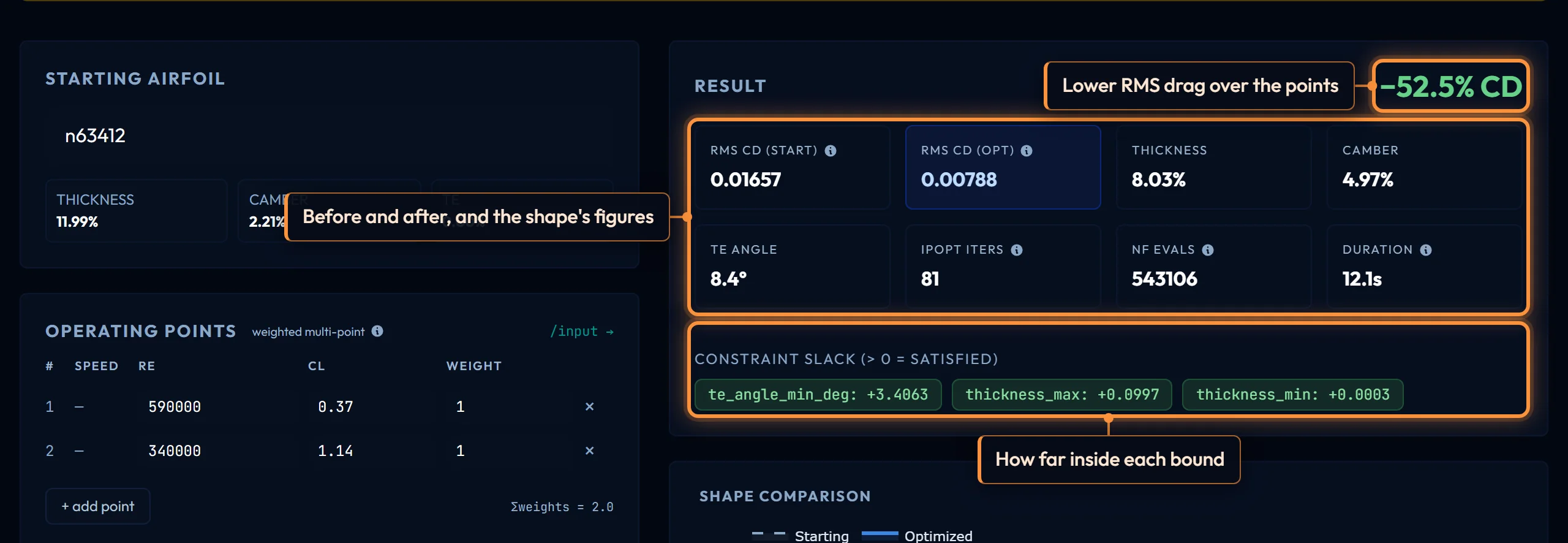
Constraint Slack is how far inside each bound the result sits, in that bound's units: positive is satisfied, a small negative an overshoot within tolerance that the Solver notes name. The plots overlay the result on the start, and Convergence draws the objective at each IPOPT iteration of the final solve: a fast drop and a flat tail is normal, a jagged tail means a constraint became active part-way.
Why a run can return nothing
Over October 2026 most failed runs were the solver's fault, and the solver was fixed. What remains splits into what you can change and what you cannot.
Yours: a lift coefficient the start cannot reach below its stall (lower it, or start from a more cambered section); a thickness or camber band the points cannot be met inside (the error names the tightest bound; widen it); too few iterations for a hard case (raise Max iters); and a point so far out that NeuralFoil will not vouch for its prediction there, a point to question rather than a setting to force. Each is refused with the reason, uncharged.
The solver's: IPOPT is sensitive to where it starts, and a request that converges from one start can stall from another. The population search exists to take that out of your hands, and the plain solve runs beside it so the search can only help. When both fail, the error says what the last iterate violated; relax the bound it names.
What this hands on
Use as root or Use as tip opens the wing designer with the section in that slot and the planform untouched, where Sections along the span continues. Save to account keeps it under a name you choose. Analyze in Section Analyze overlays it on the library in Compare. Export .DAT and .DXF write the shape for XFLR5 or CAD, the DXF at 1000 mm chord; Export CST (.JSON) writes the parameters with the request that produced them, the file to keep to reproduce a run. Open in Generator opens the Kulfan canvas but does not carry the shape with it; to edit the result there, save it and open it from the dashboard.
Controls on this page
| Control | What it does | Units |
|---|---|---|
| Starting Airfoil | The library section the solve starts from. Its polar is the dashed "Starting" curve and the baseline for the headline improvement. Any section works; a start near your thickness and camber limits converges fastest. | |
| Thickness, Camber, TE | The start as it will be drawn: maximum thickness and camber measured from its geometry, and the trailing-edge gap it carries, all as percentages of chord. Freeze TE thickness keeps the last one. | % chord |
| Operating Points | Each row is a condition the section must meet exactly: at that Reynolds number it is flown to that lift coefficient, and the drag there counts with that weight. The solver minimises the weighted sum of those drags. Up to 20 rows. | |
| Re | The Reynolds number at this point, 10,000 to 50,000,000. Each point keeps its own; a take-off point at low Re and a cruise point at high Re are solved together. Mission fills these in from speed and chord. | |
| CL | The lift coefficient the section must reach at this point, -1 to 2.5. A target the starting section cannot reach below its stall is refused before any solve, without charge. | |
| Weight | How much this point's drag counts, 0.1 to 100; the weights are normalised, so only their ratio matters. A heavier cruise point and a light take-off point lets the solver trade a little drag at one for the other. | |
| NeuralFoil model | Which NeuralFoil network evaluates every candidate. large is the default and what the stored polars use; smaller ones answer faster and less accurately, xlarge slower. The result is only as good as the model that scored it. | |
| Mach | Flight Mach number, 0 to 0.9. 0 is incompressible, right for anything in water and most model aircraft; a value above about 0.3 adds a compressibility correction to the lift and drag at every point. | |
| Max iters | The most IPOPT iterations one solve may take, 20 to 400. A run that stops here with every constraint met is still returned, with a note saying more iterations may lower the drag further. | |
| Thickness | Keeps the maximum thickness between the two values, as a percentage of chord. Opens on, at 8 to 18. Without it the solver thins the section until the spar no longer fits. | % chord |
| Camber | Bounds the camber, as a percentage of chord: a positive minimum is a floor on the peak, a negative minimum on the dip. A band within 0.25 % of zero asks for a symmetric section. Opens off, at -2 to 6. | % chord |
| CM (pitching moment) | Keeps the quarter-chord pitching moment at every operating point inside the range. Camber buys drag with nose-down moment; a floor here is how a flying wing or a stabiliser stops that trade. Opens off, at -0.15 to 0.05. | |
| TE wedge angle | The least angle the two surfaces may close at. Drag minimisation pulls the tail toward a cusp no shop can make and no structure can hold; opens on, at 5°. | deg |
| Freeze TE thickness | Holds the trailing-edge gap at the starting section's value instead of letting the solver choose it. Recommended: a free gap is one more way to shave drag that the shop has to undo. | |
| IPOPT · NeuralFoil | A gradient solve from your start, then a population search over NeuralFoil refined by IPOPT; the better of the two is returned. Gradients are exact, by CasADi automatic differentiation through NeuralFoil itself. | |
| Runs left this month | Free optimizations remaining in the month, out of the monthly allowance. After it, a run spends credits. A run that returns no airfoil is not counted and not charged. | |
| −x % CD | How much lower the RMS drag coefficient is than the start's, over the operating points both sections reach. Green is an improvement; grey means the solver could not beat the start within your constraints and handed it back. | |
| RMS CD (start) | Root-mean-square of the drag coefficient at each operating point, for the starting section. One number for the whole envelope, unweighted; the solver minimises the weighted sum, this reports the result. | |
| RMS CD (opt) | The same figure for the optimized section, re-evaluated after the solve on the geometry you are given, not read from the solver's last iterate. The headline percentage is (start − opt) / start. | |
| Thickness | Maximum thickness of the optimized section, as a percentage of chord. Compare it with the Thickness bound: a value sitting on the bound means the constraint was doing the work. | % chord |
| Camber | Maximum camber of the optimized section, as a percentage of chord. More camber than the start is the usual way the solver reaches a high-lift point cheaply. | % chord |
| TE angle | The wedge angle between the surfaces at the trailing edge of the optimized section, the figure the TE wedge constraint bounds. | deg |
| IPOPT iterations | Iterations of the IPOPT solve that produced the answer. IPOPT stops at a point where no feasible direction lowers the drag, so a small count is usually a clean convergence, not a solver that gave up. | |
| NF evals | How many NeuralFoil evaluations the run made, summed over the operating points, the population search and every IPOPT iteration and line-search step. | |
| Duration | Wall-clock time inside the solver, search and polish included. Most of it is NeuralFoil: a larger model is slower per call, more operating points mean more calls per iteration. | |
| Constraint Slack | How far inside each bound the returned section sits, in the bound's own units: positive is satisfied, zero is on the bound, a small negative is an overshoot within tolerance that Solver notes will name. | |
| Convergence | The objective, the weighted sum of CD over your operating points, at each IPOPT iteration of the final solve. A fast drop then a flat tail is normal; a jagged tail means a constraint became active part-way. | |
| Use the result | Compare runs the optimized section beside the library; Root or Tip opens the wing designer with it in that slot; Save puts it in your account. DAT and DXF are the shape, JSON the CST plus the request that made it. | |
| Open in Generator | Opens the Kulfan canvas, but does not carry the optimized shape with it. To edit the result there, Save it to your account and open it from the dashboard, or export the CST JSON and load that. |